Button Guide
Button Layout
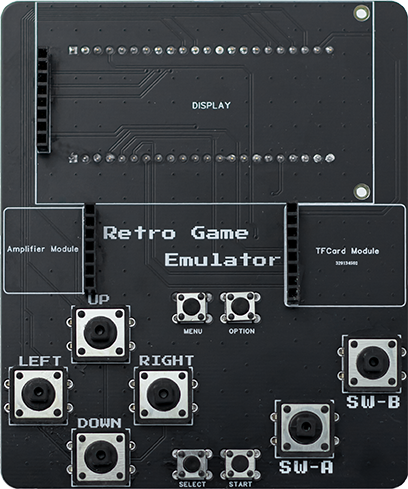
Button Functions
Game Control Buttons
Button |
Function |
|---|---|
D-pad (Up) |
Control game character to move up or menu selection up |
D-pad (Down) |
Control game character to move down or menu selection down |
D-pad (Left) |
Control game character to move left or menu selection left |
D-pad (Right) |
Control game character to move right or menu selection right |
A Button |
Confirm/Jump/Attack |
B Button |
Cancel/Return/Special function |
System Function Buttons
Button |
Function |
|---|---|
Start Button |
Start game/Pause game |
Select Button |
Select/Switch options |
Menu Button |
Open system menu |
Option Button |
Open option settings |
Note
Button mappings for different gaming platforms may vary slightly. For specific functions, please refer to each emulator’s instructions.
Tip
It’s recommended to familiarize yourself with the button layout before starting games for a better gaming experience.